⚠️ Disclaimer: As of March 1, 2027, the SOAP API will no longer be supported. The REST API will be the only API we offer from that point forward.
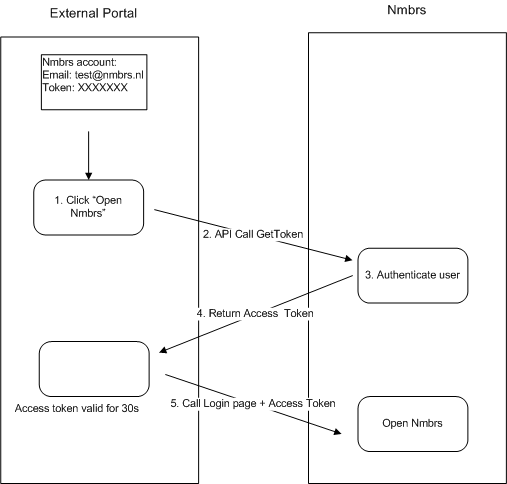
With the SSO Service you can build an auto-login application to Nmbrs.
Step 1 - Get an Access token
You can use the SSO service to request an access token. For this you have to supply a valid Nmbrs user account email and password/token.
In case you want to use username and password you use "GetToken".
For username and API token (fetched from the user interface) you use "GetToken2".
Step 2 - Make a call to our login page
You can send the receives access token to our login page in order to access the Nmbrs environement.
https://<nmbrs_environment>/applications/common/externalactions.aspx?login=nmbrs&ID=<access-token>
where:
- "nmbrs_environment" is your Nmbrs subdomain, for example "login" (https://login.nmbrs.nl)
- "access-token" is the authentication token fetched on the previous step.
Please be aware of the fact that the access token is only valid for 30 seconds.
Comments